WIYN/ODI Guide star prediction tool
Requirements:
In order to run this software you have to:- Java 1.6.
- Java webstart.
- Java Advanced Imaging.
- Allow the application unrestricted access. Note that WIYN does not yet have a certified signature for applications yet.
- An Internet connection to download guide star catalogs & DSS images.
- Be patient since this is still a beta version of the program. Any feedback is highly welcome.
Purpose of this software
ODI's design allows to compensate for image motion caused by atmospheric blur or tracking error. Such image motion correction is done in the detectors during an exposure. The appropriate correction is determined from the motion of bright guide stars; for a full correction for atmospheric blur, one guide star is needed for each 4'x4' patch. This amounts to more than 200 guide stars over the focal plane. The guide stars themselves are read out in video mode on some cells of the detector, i.e., the light has to pass any bandpass filter before being recorded! For smooth operations of ODI it is important that the guide star acquisition process will be automated with little or none user interaction. The ODI guide star prediction tool provides a service to the ODI control system to automatically select guide stars. Since the availability of guide stars determines the operational mode for image mode correction, it will be important for a scientist to check the possible guide star configurations before observing, or better, before submitting an observing proposal. The software on this page provides an interactive tool for this purpose.Guide Star Brightness Limit
Guide stars can be read out at varying frequency, but the optimum correction for atmospheric turbulence will be possible guide rate of 20Hz and more. Including all guide loop overhead, a guide star exposure time of ~20ms is a reasonable approach. However, even an exposure time of 40ms should result in a sufficiently fast guide loop to allow reasonable correction for turbulence. Such a short exposure time naturally requires guide stars to be bright, especially if they are observed through filters that are narrow or where the detector's sensitivity is low.If guide stars require longer exposure times such as 100ms or more (e.g., narrow band or very blue filters), it might be better to only correct for common image motion or to track the telescope with the guide star information only.
Based on the ODI Exposure Time Calculator we have established the following minimum brightness limits for guide stars in some selected ODI filters, and some additional narrow band filters. The basic assumption are: Seeing ~0.8" and a required S/N of 20 per guide iteration. The limiting magnitude is given either in the SDSS broad band filter itself, or in the appropriate continuum SDSS bandpass for narrow band filters. Magnitude limits are AB magnitudes.
| Filter | Limit @20ms | Limit@40ms | Limit@100ms | Limit@200ms |
| g | 14.5 | 15.2 | ||
| r | 14.4 | 15.2 | ||
| i | 14.1 | 14.9 | ||
| z | 13.3 | 14.0 | ||
| NB810 | 13.0 | 13.7 | ||
| NB915 | 12.5 | 13.6 |
How it works
Stage 1: Locate viable guide stars on OTA cells.
Viable guide stars for an area [1.2x1.2 degrees] on the sky are fetched from a catalog server. This catalog server is hosted by the ODI project on our own server. The catalog itself is the PannSTARRS IPP guide star catalog, which is based on the USNO and 2mass catalogs. With the knowledge of the world coordinate system transformation of the ODI focal plane (a boring linear transformation at this time, but this will become more complex later) all guide stars will be transformed to coordinates on the focal plane. Stars meeting the brightness requirement for a given filter and requested guide rate are assigned to the OTA cell they fall onto.Guide Star Priorisation
If more than one viable guide stars fall onto one cell the brightest star will be assigned.This might not be the optimum selection, since guide stars have been already chosen to be bright enough for fast video mode. An alternative strategy could be to assign a guide star that is closest to an CCD output amplifier to shorten the guide loop overhead due to the video mode read out. Such a modification will be easilly realized in the software through a java Sortable interface.Stage 2: Select OTA cells for guide star acquisition.
Once Stage 1 is finished, the software knows for each cell in the focal plane if there is a viable guide star or not. Based on a selected merit function, Stage 2 declares cells as active guide cells or as science cells. Currently, there are two algorithms implemented:Corner guide stars for telescope tracking & coherent correction
In each of the four corners, once guide star will be allocated. A corner are defined as the three OTA detectors at the edge of the focal plane.The underlying algorithm tries to assign one guide star in a zone, where a zone can be any selection of OTA detector in the focal plane. For the corner guide star assignment, there are four different zones defined for the corner OTAs. The underlying algorithm could, e.g., also accommodate a scenario where one guide star in each OTA will be assigned.
Guide stars everywhere for local correction
The algorithm will try to assign four guide stars in each OTA detector of the focal plane. Within each detector, the assignment is done per quadrant, i.e., in the upper left, upper right, lower left, and lower right 4x4 cell array of the detector. At least in a first iteration this approach tries to avoid a situation where four guide stars are assigned next to each other.Limitations
- No algorithm can assign guide star acquisition functions to a cell if there are no bright enough guide stars available.
- Catalog can contain misleading information, such as numerous potential guide stars in the center of galaxies or in globular clusters. There is currently no check on the local guide star density to avoid crowding situations.
- Bright stars can create a stray light halo, but from a catalog alone this can be hard to tell, especially since very bright stars (6th mag or so) might actually not be in the catalog.
The User Interface
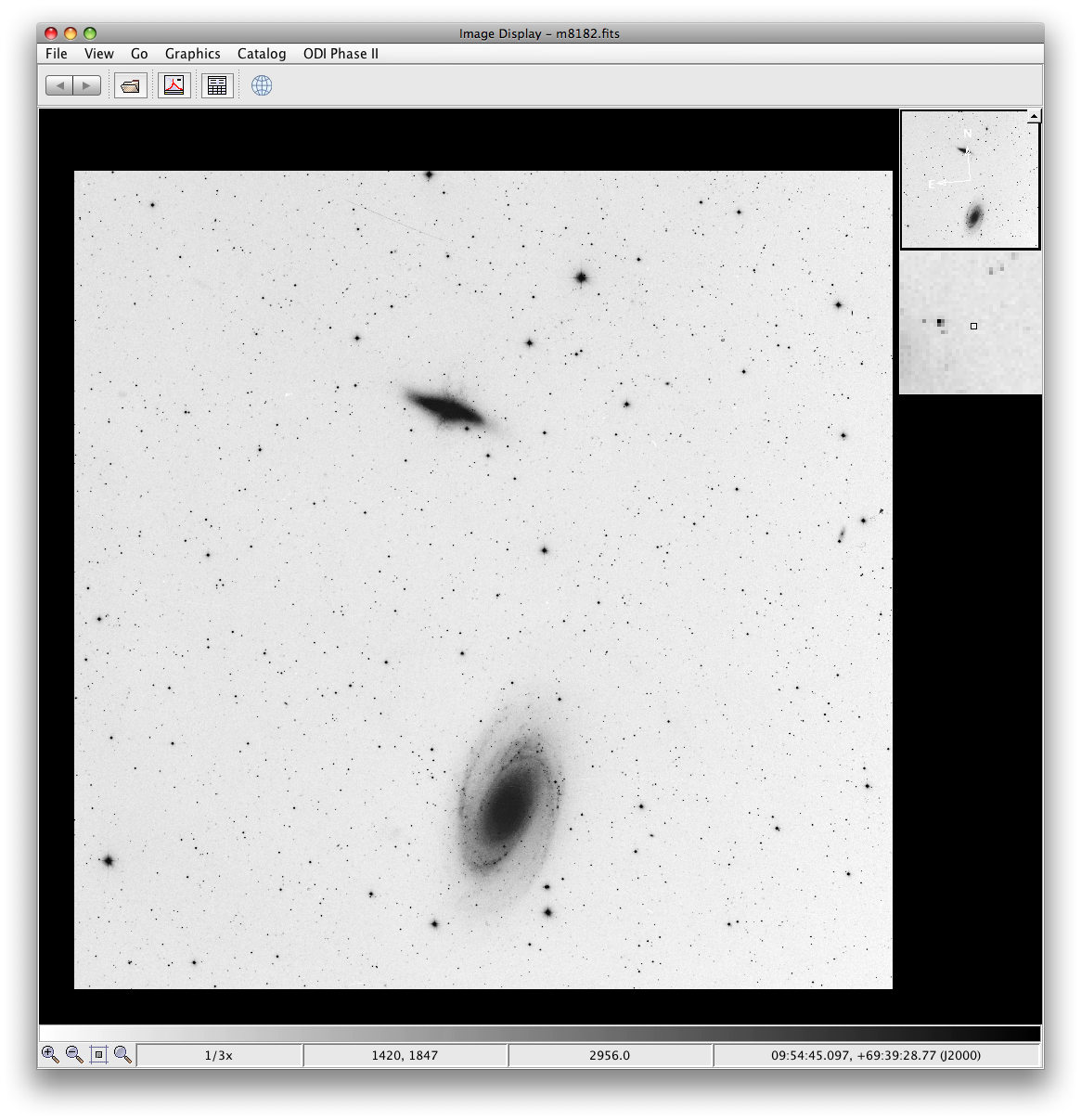 The ODI Guide Star
Prediction Tool provides a user interface for the underlying assignment
algorithms. The application is based on jsky-3 , a java application
and library of classes for astronomical image and catalog interaction.
Thus the main window is an image browser into which a background image
of the appropriate size for ODI (75'x75') should be loaded.
Note that at this time the program will not work without a fits image
loaded! Please refer to the jsky web page for how to use the image
browser. All functionality for ODI is linked into the jsky application
in the ODI Phase II menu. The most important menu point in
there is Draw Field of View , which will open a new interface
window and draw ODI's imprint on the sky on centered on the currently
loaded image.
The ODI Guide Star
Prediction Tool provides a user interface for the underlying assignment
algorithms. The application is based on jsky-3 , a java application
and library of classes for astronomical image and catalog interaction.
Thus the main window is an image browser into which a background image
of the appropriate size for ODI (75'x75') should be loaded.
Note that at this time the program will not work without a fits image
loaded! Please refer to the jsky web page for how to use the image
browser. All functionality for ODI is linked into the jsky application
in the ODI Phase II menu. The most important menu point in
there is Draw Field of View , which will open a new interface
window and draw ODI's imprint on the sky on centered on the currently
loaded image. Interface window
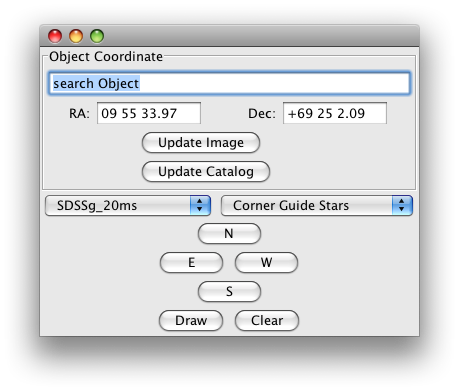 The guide
star control window unifies key functionalities for the application in
one single interface. It enables you to:
The guide
star control window unifies key functionalities for the application in
one single interface. It enables you to:
- Search for coordinates of an object (Simbad/NED).
Just enter an object name and press enter. - Load a new DSS background image:
After pressing the Update Image button a new image is loaded based on the coordinates in the Ra and Dec entry fields. Note that the image is currently loaded form the ESO DSS image server, and this can take a few minutes. So press this button wisely! - Load a new guide star catalog:
A new list of guide stars is loaded from a server at WIYN for the area of the background image. Should a catalog request fail the server at WIYN is probably down, as this whole system is still in an experimental stage. Please contact us and we will restart the catalog server. - Select the guide star exposure time and the guide star assignment strategy.
- Move the pointing of ODI to N,W, S, E in 10'' steps.
- Redraw and clear the ODI focal plane imprint:
If you change the zoom level in the image browser you might want to redraw the focal plane imprint since it is not automatically redrawn yet.
Understanding the ODI imprint display
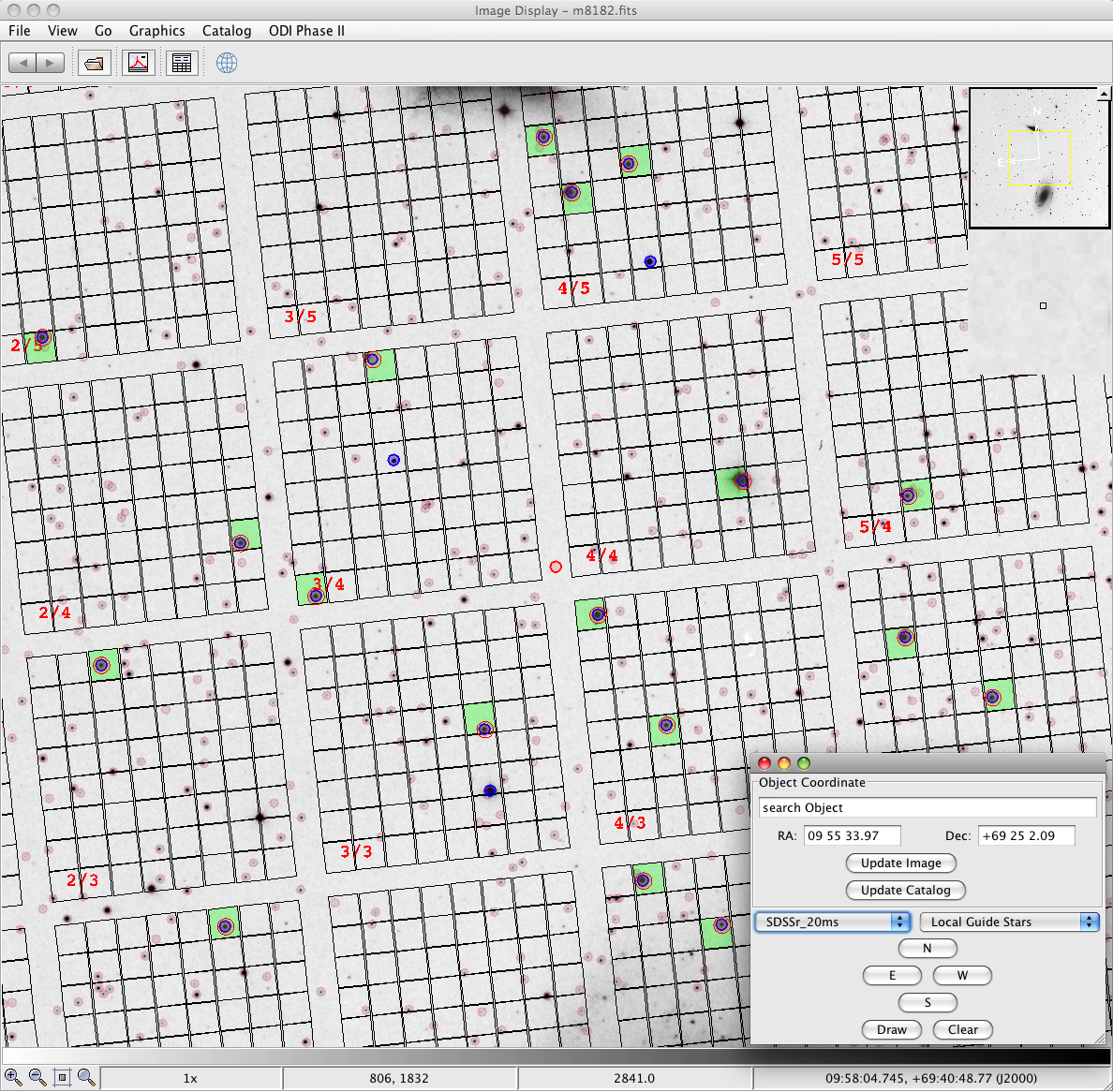 The meaning of the
parts of the image display are as follows:
The meaning of the
parts of the image display are as follows:
- Stars with light red circles
These are guide stars from the catalog. - Blue encircled stars
These are guide stars that are viable for the selected guide speed and are assigned to an OTA cell. - OTA cells with light green background
Cells with light green background are assigned as an active guide star acquisition cell, i.e., from this cell there will be a guide star video stream recorded during an exposure of the blue encircled star in that cell. Such a cell will not record an image of the sky!
So what do I do next with the guide stars?
Now that you have seen the assigned guide stars and in which cells they are going to be, you basically have reached the end point of the current state of the application. In the future we plan to make this information actually available in a human/machine readable way for future use.Known issues
This software is in a too preliminary state to list known issues since there are too many of them. If you have any questions or suggestions, please contact Daniel Harbeck (harbeck at wiyn.org).Future plans
Some future ideas here: dither pattern coverage, more filters, automatic check for different OT correction modes.Credit
- This software is based on jsky-3 libraries. This package really helped to concentrate on the functionality rather than the interface creation.
- The PanSTARRS IPP guide star catalog was kindly made by the PanSTARRS team. This catalog is based on the USNO-B, 2MASS, and Tycho catalogs.